
Show the formula and working
This gaming PC electricity cost calculator works out what a gaming PC and monitor cost to run per hour of gaming, per day and per year, for players in the UK, Germany, the Netherlands, Ireland and France. It builds the power at the wall from the graphics card, processor and the rest of the system, allows for power supply losses, and adds desktop time. A pound and euro switch lets you enter your rate in pence or cents, or you can enter a figure measured with a plug-in energy monitor.
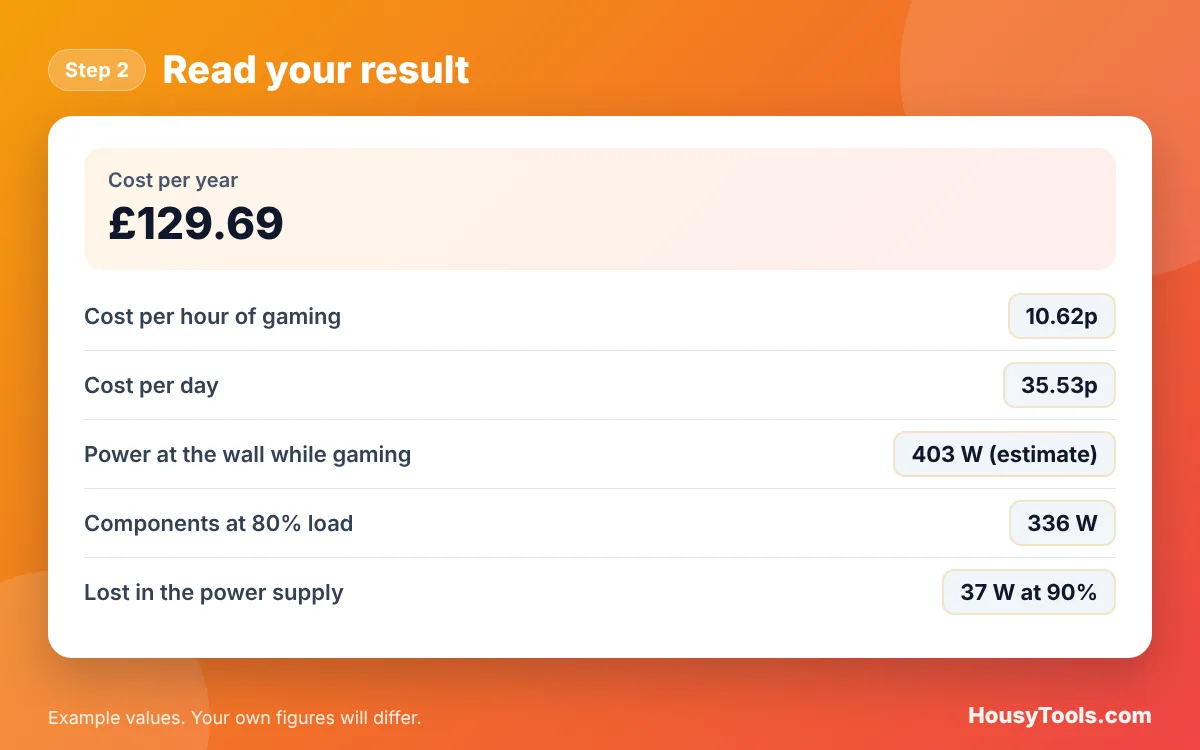
Quick answer: Multiply the watts at the wall by hours and divide by 1,000 to get kWh, then multiply by your unit rate. A PC drawing 403 W with its monitor costs about 10.6p an hour at 26.32p per kWh. With 3 hours of gaming and 2 of desktop use a day, the gaming PC electricity cost calculator shows £129.69 a year.
What Is a Gaming PC Electricity Cost Calculator?
A gaming PC electricity cost calculator is a tool that estimates the electricity a gaming setup uses and what that costs. The formula in plain words: component power = (graphics card + processor + rest of the PC) x average load; power at the wall = component power / power supply efficiency + monitor; kWh per day = (gaming watts x gaming hours + desktop watts x desktop hours) / 1,000; cost = kWh x unit rate.
The power supply loses some energy as heat when it converts mains electricity for the PC. The 80 PLUS certification sets minimum efficiencies: on 230 V internal units, Gold must reach 90% at 20% load, 92% at half load and 89% at full load.
How Do You Use the Gaming PC Electricity Cost Calculator?
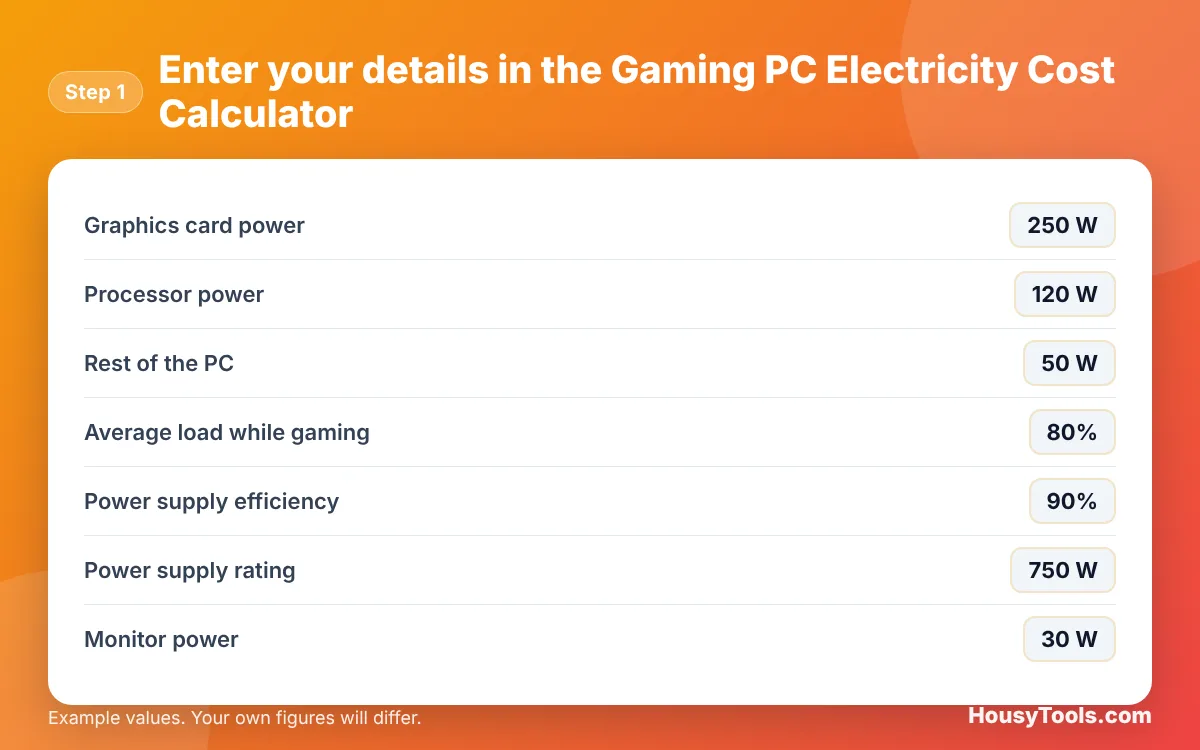
- Enter the Graphics card power, Processor power and Rest of the PC from the spec sheets.
- Set the Average load while gaming, the Power supply efficiency and the Power supply rating.
- Enter the Monitor power. If you have a plug-in energy monitor, enter its reading in Measured power at the wall while gaming (optional) instead.
- Enter the Gaming hours per day, the Desktop or idle hours per day and the Desktop power at the wall.
- Set the Days per week and your Electricity unit rate.
- Read the yearly, daily and hourly cost, then open “Show the formula and working” to see each step.
How Much Does It Cost to Run a Gaming PC per Hour?
A gaming PC drawing 400 W at the wall, including the monitor, costs about 10.5p an hour at the UK cap rate of 26.32p per kWh, and about 14c an hour at an example rate of 35c per kWh. Lighter systems drawing 150 W cost about 4p an hour, while high end systems pulling 700 W cost over 18p.
| Power at the wall | Cost per hour at 26.32p | Per year at 3 h a day | Cost per hour at 35c (example) | Per year at 3 h a day |
|---|---|---|---|---|
| 150 W | 3.95p | £43.23 | 5.25c | €57.49 |
| 300 W | 7.90p | £86.46 | 10.50c | €114.97 |
| 400 W | 10.53p | £115.28 | 14.00c | €153.30 |
| 500 W | 13.16p | £144.10 | 17.50c | €191.63 |
| 700 W | 18.42p | £201.74 | 24.50c | €268.27 |
The 26.32p rate is the Ofgem price cap for 1 October to 31 December 2026. The 35c euro rate is only an example, so enter the rate from your own bill.
Does a Bigger Power Supply Use More Electricity?
No. A power supply only draws what the PC needs plus its own losses, so a 1,000 W unit does not use 1,000 W. What matters is its efficiency at your actual load. Efficiency is usually highest around half load, so a unit sized well above your gaming draw is not wasteful, but one that is oversized many times may run at a low, less efficient load. The calculator shows how hard your PSU is working.
Is It Cheaper to Game on a Console or a PC?
Current consoles generally draw less power than a mid to high end gaming PC, so they usually cost less per hour to run, but the difference depends on the hardware and the game. The fairest comparison is to measure both at the wall with a plug-in energy monitor and enter the readings. The electricity cost calculator handles any single device, and the standby power cost calculator covers consoles left in rest mode.
How Can I Reduce My Gaming PC’s Electricity Use?
Cap the frame rate to your monitor’s refresh rate, turn on the GPU’s power saving or efficiency mode, and let the PC sleep instead of idling for hours. These cut the average load, which has the biggest effect on cost. A more efficient power supply helps a little, and switching off the monitor and speakers at the wall stops standby use.
Worked Example: Yearly Cost of a Mid Range Gaming PC
Example: a gaming PC has a 250 W graphics card, a 120 W processor and 50 W for the rest of the system, running at an example 80% average load through a 90% efficient 750 W power supply, with a 30 W monitor. It is used for 3 hours of gaming and 2 hours of desktop use at 70 W every day, at 26.32p per kWh. These are the calculator’s default inputs.
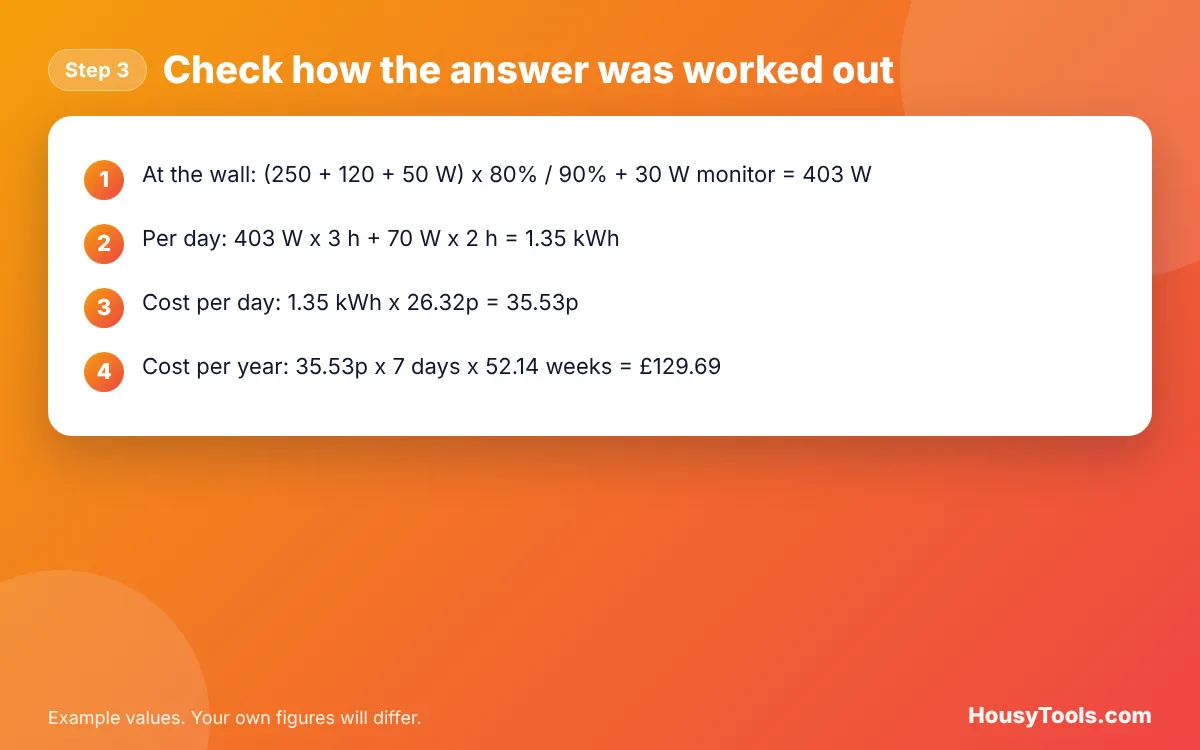
- At the wall while gaming: (250 + 120 + 50 W) x 80% / 90% + 30 W = 403 W.
- Per day: 403 W x 3 h + 70 W x 2 h = 1.35 kWh.
- Cost per day: 1.35 kWh x 26.32p = 35.53p.
- Cost per year: 35.53p x 365 days = £129.69.
Switch the calculator to euros and enter an example rate of 35c per kWh, and the same PC costs €172.46 a year.
Gaming PC Electricity Cost Calculator FAQs
How many watts does a gaming PC use?
A typical gaming PC uses somewhere between about 150 W and over 600 W while gaming, depending mainly on the graphics card and processor. At the desktop it may use well under 100 W. A plug-in energy monitor gives the exact figure for your system.
How much does a gaming PC cost per month to run?
With the default example of 3 hours of gaming and 2 hours of desktop use a day at 26.32p per kWh, a mid range PC costs about £10.81 a month. Heavier use or a high end graphics card can easily double that.
Does the monitor add much to the cost?
A typical monitor uses tens of watts, so it adds a small but steady amount. Large, bright or high refresh rate screens use more. Check the energy label or spec sheet and enter the figure, or include it in a measured reading at the wall.
Why use the power at the wall rather than the PSU rating?
The PSU rating is the most it can supply, not what it draws. The real cost depends on the power the parts actually use plus the losses in the power supply, which is what an energy monitor measures at the wall socket.
What load should I use for gaming?
Games rarely run every part at full power all the time, so the calculator uses an example average of 80%. Demanding games at high settings run closer to full load, and lighter games far less. A measured reading is the most accurate option.
Is it safe to run a gaming PC from an extension lead?
A single gaming PC draws well under the 13 A limit of a UK plug and extension lead. Avoid plugging heaters or kettles into the same lead, keep the total under 13 A, and never chain extension leads together.
Checked October 2026. Sources: Ofgem: energy price cap 1 October to 31 December 2026 (26.32p per kWh), Wikipedia: 80 Plus (230 V EU internal efficiency requirements).